
Introduction
The allure of working from anywhere, trading your office cubicle for a beachside café, is stronger than ever. Digital nomad visas are your ticket to this freedom, but before you pack your bags, there's a crucial step: the visa photo. Getting it wrong can lead to delays or even rejection.
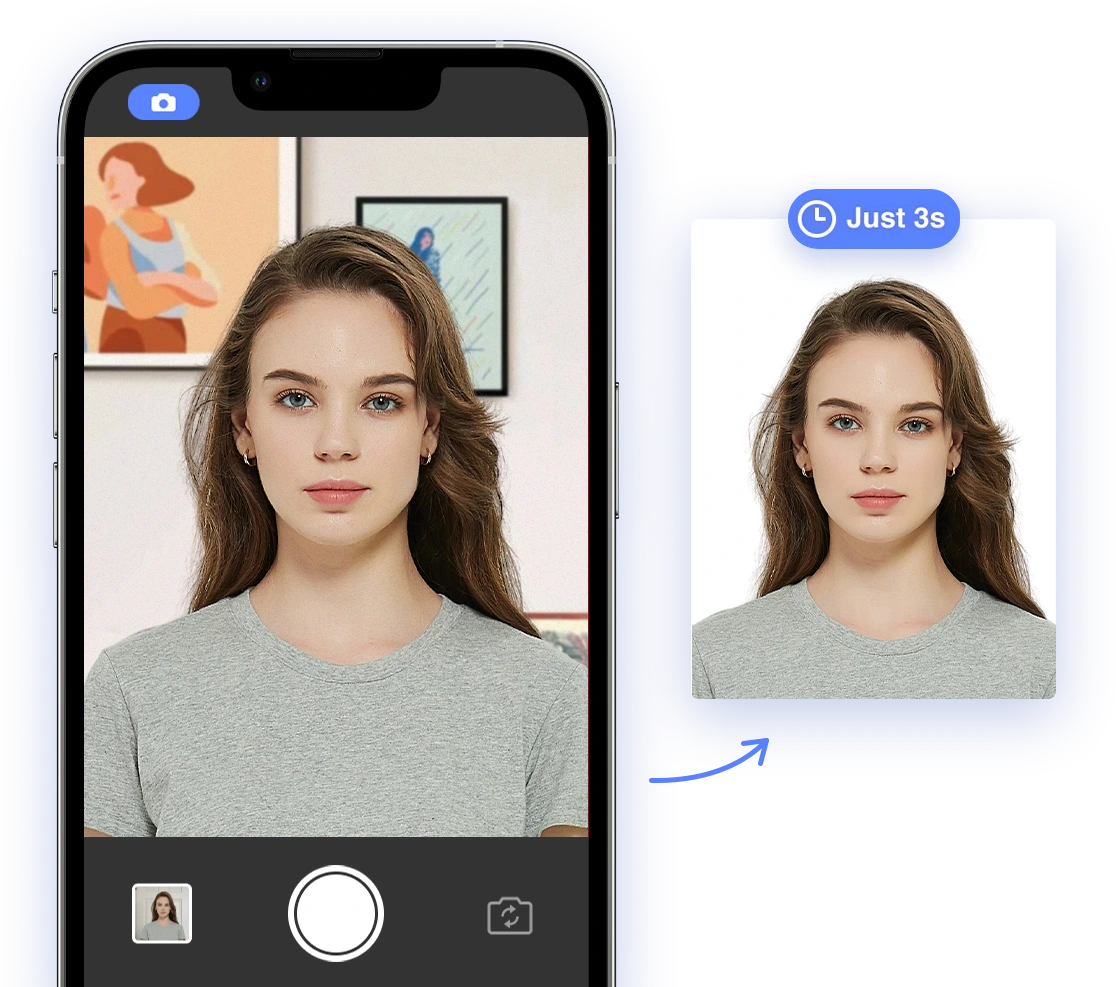
This comprehensive guide equips you with the essential knowledge to conquer digital nomad visa photo requirements in 2026. We'll break down general guidelines, explore country-specific rules, provide DIY tips for taking compliant photos at home, and show you how AI Passport Photo can make the process effortless, regardless of where your nomadic journey takes you.
Ready to ditch the photo studio and take control of your visa application? Let's dive in!
Understanding the Requirements
General Requirements
Regardless of your destination, some photo ID requirements are standard. These include:
- Color: Photos must be in color.
- Size: While specific sizes vary, a common size is 35x45 mm. The USA requires a size where the head is between 1 inch and 1 3/8 inches (22 mm and 35 mm) or 50% and 69% of the image's total height. Check out this video for helpful passport photo tips: Passport Photo Tips.
- Background: A plain white or off-white background is generally required. Some countries like Indonesia may accept white, red, or blue backgrounds, depending on the application year and visa category.
- Facial Expression: You should have a neutral facial expression with both eyes open.
- Attire: Wear clothing you normally wear on a daily basis. Uniforms should not be worn, except religious clothing worn daily.
- Head coverings: Do not wear a hat or head covering that obscures the hair or hairline unless worn daily for religious purposes. Your full face must be visible, and the head covering must not cast shadows on your face.
- Glasses: Eyeglasses are generally not allowed, except in rare circumstances for medical reasons.
- Recency: The photo must be taken within the last 6 months to reflect your current appearance.
- Digital Alteration: AI-altered photos are generally banned, including those with filters or that smooth skin or alter facial features. As the industry leader in passport and visa photo services, we process millions of photos each year using cutting-edge AI technology and human verification.
- File Size: eVisa portals usually have file size limits (typically 200-500 KB).
Failing to adhere to these can lead to rejection. See these mistakes to avoid with this video: Vietnam Visa Photo Rules for US Travelers (7 Mistakes That Get You Rejected)
Country-Specific Digital Nomad Visa Photo ID Requirements
While general guidelines exist, specific requirements vary significantly by country. Let's look at some popular digital nomad destinations:
- Portugal: To apply for a digital nomad visa for Portugal, you'll need to provide two identical, recently taken, passport-sized color photographs of yourself.
- Size: 3.5 cm x 4.5 cm (1.38 inches x 1.77 inches).
- File Size (for online applications): Typically under 120 KB.
- Format (for online applications): JPG or JPEG.
- Color: Colored photos are required.
- Background: Plain white or light-colored background. A medium grey background is suitable for light-colored hair, while a light grey background is suitable for dark hair. The background should not be patterned, and shadows are not acceptable.
- Face Position: Full face, front view, eyes open and clearly visible.
- Head Coverage: The head should take up about 70–80% of the photo. The face should measure between 27 mm and 40 mm.
- Photo Quality: High resolution, clear, sharp, and well-lit. Photos should be printed on high-quality paper with a resolution of at least 600 dpi. The color photograph must have proper color balance with appropriate brightness and contrast.
- Recency: Taken within the last 6 months.
- Head Coverings: Generally not allowed, except for religious or cultural reasons.
- Eyeglasses: Allowed if the lenses are not tinted and there is no glare. The frame should not obscure the expression of the eyes.
- Facial Expression: Neutral.
- Other: The photo must not have any borders or extra margins. Hair should not cover the face.
- Indonesia (Bali): To apply for a digital nomad visa for Bali, Indonesia, you'll generally need a recent color photograph that meets specific requirements.
- The photo should be recent.
- It must be in color.
- The required size is typically 4 cm x 6 cm, but 3x4 cm may also be accepted, depending on the application requirements.
- The background should be white. In some cases, a red background may be acceptable, depending on the specific application method.
- Image quality:
- Acceptable formats are JPEG, JPG, or PNG.
- The resolution should be at least 400x600 pixels.
- The file size should not be larger than 2MB.
- Appearance:
- Your head should fill 50-60% of the photo's height.
- Your eyes should be positioned 50-60% above the bottom of the photo.
- You should look directly at the camera with a neutral expression.
- Hats are generally not allowed unless worn for religious reasons, and your face must be completely visible.
It's important to note that specific requirements can vary depending on the type of visa and the application process. Ensure you check the latest official guidelines from the Indonesian Directorate General of Immigration or the Indonesian embassy or consulate in your country.
- Thailand: For a Thailand digital nomad visa, specifically the Destination Thailand Visa (DTV), you'll generally need to adhere to the following photo requirements:
- Size: Photos should be 2 inches. Alternatively, some sources mention 3.5 x 4.5 cm (roughly 1.4 x 1.8 inches) or 4x6 cm with dimensions of at least 472 pixels x 709 pixels.
- Color: The photo must be in color.
- Background: A white background is typically required. Some sources also mention an off-white background as acceptable.
- Recency: The photo must be taken within the last 6 months.
- Appearance:
- Full-faced view.
- Neutral expression with eyes open. Avoid smiling or frowning.
- The face should take up 70-80% of the photo and be centered.
- Avoid shadows on the face or background.
- Headgear is generally not allowed unless for religious reasons, and even then, it shouldn't obstruct the face.
- Japan: Here's what you need to know about the photo requirements for a Japan Digital Nomad Visa:
- General Requirements:
- Size: The required dimensions are generally 45mm x 45mm, but some sources mention 4cm×3cm or 35mm x 45mm. It's best to confirm with the specific embassy or consulate where you're applying. The U.S. Embassy in Japan specifies 2" x 2" (or 5 cm x 5 cm).
- Recent: The photo must be taken within the last 6 months. Some sources say within 3 months.
- Color: Photos must be in color.
- Background: A plain white background is required, with no patterns, objects, or shadows.
- Face Size: Your face should occupy about 80% of the photograph. The area from the top of your head to your chin must be no less than 32mm and no more than 36mm high.
- File Size: If submitting a digital photo, it should be under 120 KB. Another source mentions the required size is 240kb, and the minimal resolution is 300 dpi, in pixels this will be 1062 pixels in width and 1062 in height.
- Format: Digital photos should be in JPG, JPEG, or PNG format.
- Quality: The photo must be clear, sharp, and in focus, with even brightness. Avoid pixelated images.
- Borders: No borders are allowed.
- Paper: If printing, use matte paper. Matte or glossy photo quality paper is also acceptable.
- Appearance:
- Orientation: You must face forward, with your full face visible.
- Facial Expression: A neutral expression is required, with your mouth closed. A slight, controlled smile may be acceptable.
- Eyes: Your eyes must look directly into the camera.
- Glasses: If you wear glasses, make sure the frames are not thick and the lenses are clear, ensuring your eyes are fully visible without reflections or glare. Some sources say to take off your eyeglasses for your photo.
- Headgear: Headwear is generally prohibited unless worn for religious reasons, in which case your face must not be covered. If headgear is worn, it must be dark-colored to contrast with the background.
- Hair: Your hair and shoulders must be visible. For women, it's recommended to tie your hair back so that your ears, eyebrows, and forehead are fully visible.
- Makeup: Avoid bright makeup and bold lipstick.
- General Requirements:
- Spain: To apply for a digital nomad visa in Spain, you'll need to provide a recent passport-size color photograph.
- Size: The photo size should be 4.5 x 3.5 cm.
- Background: It should be taken against a light background.
- Appearance: You should be facing forward, without dark or reflective glasses, or any garments concealing the oval of your face.
Always consult the official embassy or consulate website for the most up-to-date information. See the video Take the perfect photo for your Visa with this tip!
DIY Tips for Success
Taking your digital nomad visa photo at home can be convenient and cost-effective, but it requires careful attention to detail. Here are some tips:
- Lighting: Natural light is best. Position yourself facing a window, avoiding direct sunlight which can create harsh shadows.
- Background: Use a plain white sheet or wall as your background. Ensure it's free from patterns or distractions. If you are having issues with finding a white background, here are some helpful tips to point you in the right direction.
- Camera: Use a smartphone with a decent camera, or a digital camera.
- Framing: Ensure your entire face is visible, from the top of your hair to your chin. Maintain a neutral expression and look directly at the camera.
- Assistance: Have someone help you take the photo to ensure proper framing and focus.
- Attire: Wear appropriate attire. Be sure to check this video Everything You Need To Know About Saudi Visa Photo Requirements.
AI-Powered Solutions with AI Passport Photo
AI Passport Photo simplifies the entire process, ensuring compliance even with unique country-specific regulations.
- AI-Powered Checks: Our AI instantly analyzes your photo, verifying that it meets all requirements for your chosen destination, from size and background to head position and facial features.
- Background Removal and Adjustment: Need a plain white background? Our AI can automatically remove and replace your background with a compliant one.
- Size and Resolution Optimization: AI Passport Photo automatically resizes and optimizes your photo to meet the exact specifications for your digital nomad visa application.
With AI Passport Photo, you can confidently take your photo at home, knowing it will meet all requirements. If you are applying for US citizenship, see this article regarding USCIS Photo Requirements for Citizenship: A 2024-2025 Guide for Perfect Photos.
Common Mistakes to Avoid
General Mistakes
- Poor Lighting: Shadows, glare, or uneven lighting are common reasons for rejection.
- Incorrect Background: A busy or non-white background will likely lead to rejection.
- Incorrect Size/Dimensions: Using the wrong photo size or dimensions.
- Unnatural Expression: Smiling, frowning, or raising your eyebrows can cause issues.
- Wearing Glasses or Headwear: Unless medically or religiously required, these are generally not allowed.
Double check these and ensure you have a compliant photo. For more tips, see What are the requirements for hair on passport photos in the United States?
Destination-Specific Errors
- Portugal: Not ensuring the photo has proper color balance with appropriate brightness and contrast.
- Indonesia (Bali): Not verifying the required photo size (3x4 or 4x6 cm) with the specific application method.
- Thailand: Not adhering to the full-faced view and neutral expression requirements.
- Japan: Submitting a digitally modified photo or a selfie.
- Spain: Wearing garments concealing the oval of your face.
Uploading and Submitting Your Photo
Once you have a compliant photo, you'll need to upload it to the visa application platform.
- File Format: Ensure your photo is in the correct format (e.g., JPEG).
- File Size: Check the maximum file size allowed and compress your photo if necessary.
- Resolution: Ensure your photo meets the minimum resolution requirements.
Carefully follow the instructions on the application platform to avoid any issues during submission. Remember to follow this advice before starting your new Digital Nomad journey: DONT be a Digital Nomad Until You Watch This (Brutally Honest Reality)
<